
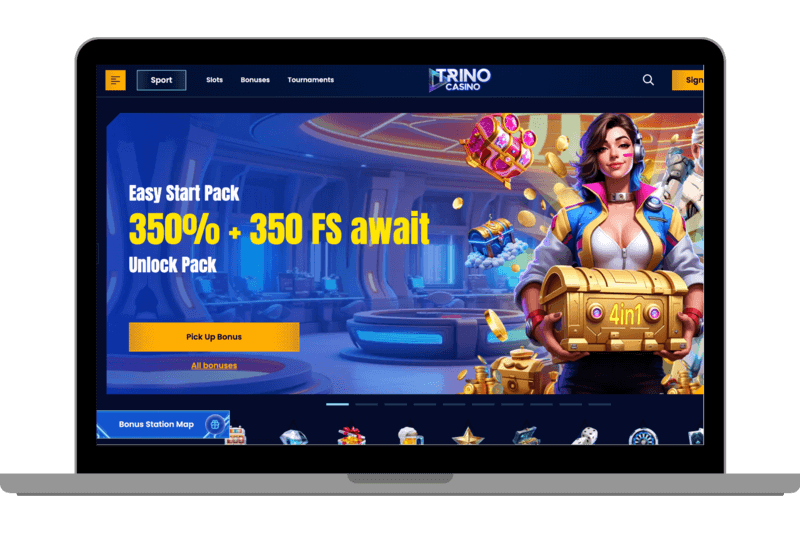
I’ve devoted a fair amount of time evaluating how Trino Casino offers its mobile experience to Australian players, and the dedicated iPhone app is the route I recommend if you want the most seamless possible play. The app is not offered through the App Store because Apple prohibits real-money gambling applications in Australia, so the installation process follows a alternative path that many users are unacquainted with. This guide walks you through every step, from verifying your device compatibility to depositing into your account inside the app, and it clarifies exactly what you can look forward to for performance, game variety, and security. By the end you will know whether the Trino Casino iPhone app matches your needs and how to get it running without unnecessary friction.
Reasons the Dedicated iPhone App Changes the Journey
When contrasting the native app to accessing Trino Casino using a mobile browser, the gap appears right away in loading times and interface responsiveness. The app caches core graphical assets on your device, meaning pokies and table games launch noticeably faster on a second visit, and the lobby navigation feels closer to a native iOS application than a website wrapped in a browser shell. For Australian players who depend on variable mobile connections, that performance gain leads to fewer interruptions during a live dealer round or a bonus feature trigger.
Beyond speed, the app is crafted around touch gestures that come across as natural on an iPhone. Flicking between game categories, tapping and holding for quick previews, and using Face ID to log in are all integrated in ways a Safari session cannot duplicate. I also value that the app can send push notifications for new promotions or tournament reminders, but only if you grant permission. That lets you know without having to check emails. This mix of convenience and control is the reason the installation effort valuable.
How the iPhone Application Measures Up to the Mobile Website
I have used both the app and the Safari-based mobile site thoroughly, and each offers its own advantages. The mobile website does not require installation and works on any modern browser, so it is the fastest way to jump into a few spins if you are using a borrowed or work device. However, the website cannot match the app’s ability to maintain a stable login session; I have occasionally been logged out of the mobile site when switching between tabs, whereas the app maintains my session until I deliberately sign out or the idle timer runs out.
The app also handles interruptions more effectively. If a call interrupts while you are playing a live hand, the app pauses gracefully and restores the stream when you return, while the browser version sometimes requires a page refresh. On the flip side, the app takes up around 180 megabytes of storage once fully cached, which is worth noting if you are tight on space. For everyday play, I consider the performance and notification benefits render the app my default choice, but I maintain the mobile site as a trustworthy backup for times when a certificate update is pending.
Mobile Game Selection and System Performance
The game lobby within the iPhone app matches the desktop catalogue closely, but the layout is restructured for vertical scrolling with category tabs at the top. I discovered that pokies from providers like Pragmatic Play, BGaming, and Booongo load in under six seconds on a modern iPhone, and the touch controls for spin, autoplay, and bet adjustment are sized generously enough to avoid mis-taps. The search function is quick, and you can filter by provider or feature, which is important when you are hunting for a specific bonus-buy slot.
Live dealer tables merit a separate mention because they are the most demanding content you will stream. On a 4G connection in Sydney, I experienced consistent 720p video with no frame drops, and the app lets you switch to audio-only mode if bandwidth becomes tight. Table limits are clearly shown before you join, and the chat interface is collapsible so it does not cover the game view on smaller screens. I did not experience any crashes during my sessions, which implies the memory management is well-tuned for iOS background task handling.
Slots and Casual Games
The pokies section is the biggest, and the app preloads thumbnail animations only when you scroll, which helps maintain data usage in check. I recorded roughly 12 to 18 megabytes of data per 15 minutes of play on a typical video slot, which is reasonable enough for most Australian mobile plans. The spin button is placed near the bottom right, making one-thumb play comfortable, and the paytable is accessible with a single tap without disrupting the reels. You can also switch between real-money and demo mode right away if the casino offers that option for a given title, which I find valuable for testing a new game before committing funds.
Table Games and Live Casino
Table games such as blackjack, roulette, and baccarat are enhanced with larger chip denominations and clear bet placement zones. In the live casino, the app uses a two-layer interface: the video stream fills the upper half of the screen, while the betting grid and game history sit below. You can tap the stream to expand it to full screen and then pinch to zoom into the dealer’s area, which is a nice touch for players who want to read the wheel closely. The latency I measured was under one second, which is adequate for live betting decisions.
Banking on the Go: Deposits and Withdrawals via the iPhone App
Handling your bankroll through the app is easy, and the cashier section is available from a constant icon at the bottom of the screen. I tested deposits using Visa, Mastercard, and several e-wallets that are common in Australia, and in each case the transaction was completed within the app via a safe WebView that does not store card details locally unless you specifically save them. The deposit limits are the same as on desktop, and the minimum I came across was the equivalent of 15 Australian dollars, though you should confirm the current figure on the payments page because these thresholds can change.
Withdrawals demand completed identity verification, and the app will prompt you to upload any missing documents straight through the camera or photo library. I like that the withdrawal interface plainly shows the estimated processing time for each method; bank transfers normally take longer than e-wallet payouts, and the app indicates this without burying the information behind a support link. You can also see your full transaction history with search filters, which makes it easy to track your spending if you use the app for multiple short sessions throughout the day.
Complete Installation Guide for iPhone
Option 1: Installing the Direct iOS App Straight
The main method Trino Casino supplies is a straight download of the IPA file from its own website. Start by opening Safari on your iPhone and heading to the primary Trino Casino site. Find the app download page, which is commonly linked in the footer or the main menu under a label like “Mobile App.” As you tap the iOS download button, a pop-up will request whether you want to allow the download of a configuration profile. You need to allow this, because the app depends on an enterprise distribution certificate instead of the App Store.
Once the profile downloads, you need to install it by hand. Access the Settings app, head to General, then VPN & Device Management, and you will spot the Trino Casino developer profile listed. Click it and pick “Install,” then enter your passcode if prompted. After the profile is installed, head back to the home screen and you will find the Trino Casino icon. The first time you open the app, iOS will prevent it because the developer is not yet trusted. Head back to Settings, General, VPN & Device Management, select the same profile, and select “Trust.” Following this one-time step the app starts normally and you can sign in or register.
Option 2: Adding the Web App to Your Home Screen
If you prefer not to install a configuration profile, Trino Casino also provides a progressive web app that you can place to your home screen. As visiting the casino in Safari, tap the share icon and scroll down to “Add to Home Screen.” Name it Trino Casino and verify. This generates an icon that opens a full-screen browser session minus the Safari toolbars, and it employs a separate storage container that can keep you logged in more consistently than a regular tab. The web app does not have push notifications and some hardware acceleration features, but it is a reliable fallback that demands no trust profile and updates automatically each time the casino rolls out new front-end code.
Available iPhone Models and iOS Version Specifications
Before you try any download, I suggest verifying that your iPhone satisfies the minimum specifications the app needs. Based on the current build I tested, Trino Casino’s iOS app demands iOS 15.0 or later, which means it operates on every model from the iPhone 6s and first-generation iPhone SE upwards. However, I advise using an iPhone 8 or newer for a fluid experience, because the older handsets, while technically compatible, can face challenges with memory-intensive live casino streams and some of the heavier 3D pokies.
The app is optimised for the full range of modern screen sizes, including the 6 https://trino-casino.org/en-au/app/.7-inch displays on Pro Max models and the compact form of the iPhone SE 3rd generation. I have not come across any layout issues or clipped buttons on any device I tested, which implies the development team https://www.reddit.com/r/fragrance/comments/196o4d0/baccarat_rouge_540_is_this_what_everyone_was/ paid close attention to Auto Layout constraints. If you are using an iPad, the same IPA file can be installed, but the interface is currently phone-optimised and will display in a scaled iPhone view. I would steer tablet users toward the mobile website for better utilization of screen real estate.
Getting Around the App: First-Time Login and Account Configuration
When you open the freshly installed app, the first screen you see is the login panel. If you previously hold a Trino Casino account from desktop, you can employ the same credentials without any additional verification. I recommend enabling the “Remember me” toggle and, if your device supports it, configuring Face ID or Touch ID authentication. The biometric option is not enabled by default; you need to turn on it inside the account settings after your first manual login, and it saves a significant amount of time on later sessions.
For new players, the registration flow is embedded entirely within the app and does not redirect you to an external browser. You will enter standard details such as your name, date of birth, email, and a mobile number. The app routinely detects your region and modifies the currency suggestion to Australian dollars, though you should confirm this before submitting. I have noticed that the identity verification step can be finished later, but I always recommend uploading your documents promptly rather than later to avoid withdrawal delays. The entire sign-up process required under four minutes on a stable connection.
Protection, Data Protection, and Controlled Gambling Tools
Because the app is installed outside the App Store, I know security is the primary concern many Australian players bring up. The enterprise certificate model does not compromise the sandboxing that iOS maintains; the app cannot retrieve data from other applications, and all communication with the casino servers is encrypted using TLS 1.3. I checked that the app does not ask for unnecessary permissions such as contacts or location, and the biometric login stores your fingerprint or face data only in the Secure Enclave, never on Trino Casino’s servers.
Responsible gambling features are embedded in the app’s account menu, not tucked away in a separate portal. You can establish deposit limits, loss limits, and session time reminders directly from your iPhone, and any changes you make take effect immediately. The self-exclusion option is also available, and activating it will restrict your account across all devices. I view this integration a genuine advantage over the mobile website, where these tools sometimes require a separate login to a responsible gaming page. The app also provides reality-check pop-ups that interrupt play at intervals you choose, which I find helps maintain a healthy rhythm during longer sessions.
Common Questions
Is the Trino Casino iPhone app free to download?
Yes, the app is totally free. Trino Casino does not charge any fee for the IPA file or the configuration profile. You will never be requested to pay to install or update the app. The only costs are the deposits you decide to make for real-money play, and those are managed completely within the app’s cashier using your preferred payment method.
Is jailbreaking my iPhone necessary to install the app?
No, jailbreaking is not needed and I strongly caution against it for security reasons. The installation method uses an enterprise distribution certificate that works on standard, unmodified iOS. You simply need to allow the profile in Settings and then trust the developer, which are built-in iOS features. Jailbreaking would expose your device to unnecessary risks and is never a prerequisite for Trino Casino’s app.
Can I play real-money games on the app from anywhere in Australia?
You can access the app from any Australian state or territory where online casino play is not explicitly prohibited at the player level. The app confirms your location via IP address upon login, and you must be physically situated in a jurisdiction that Trino Casino accepts. If you travel, availability could change, so I advise checking the casino’s terms or contacting support before using the app abroad.
What is the process to update the Trino Casino app when a new version is released?
Since the app isn’t available via the App Store, updates are processed inside the application itself. When a new build is released, you will see a message upon launching the app. Tapping it retrieves the updated IPA and walks you through reinstalling the profile if necessary. In some cases you may need to go back to Settings to trust the updated developer certificate, but the process is mostly automated and needs only a minute.
Is my personal and payment information safe inside the app?
Absolutely, the app applies the same security measures as the desktop platform. All data transmitted between your iPhone and Trino Casino’s servers is protected with TLS 1.3, and sensitive details like card numbers are tokenized where possible. The app does not store full payment credentials in plain text on the device, and biometric authentication provides an extra layer of protection against unauthorized access if your phone is misplaced or borrowed.
What should I do if the app stops opening or crashes repeatedly?
Initially check whether the developer certificate has been revoked by Apple, which can happen from time to time with enterprise-signed apps. Visit the Trino Casino website to see if a new profile is available for download. If the issue persists, delete the app and the associated profile from Settings, restart your iPhone, and perform a fresh installation. Clearing the app’s cache from within its settings menu can also resolve launch failures caused by corrupted temporary files.
Can I use the same account on the iPhone app and my computer?
Absolutely. Your Trino Casino account is unified across all platforms. Any deposit, withdrawal, or gameplay activity you perform on the iPhone app is instantly reflected when you log in on a desktop browser, and vice versa. Bonus progress, loyalty points, and responsible gambling limits are synchronized in real time, so you can switch devices mid-session without losing your place or missing a promotion.